Is the Macbook Pro 14 M3 2023 Still Good in 2026? Long-Term Review
When I first walked out of the store with the Space Gray MacBook Pro 14-inch M3 in late 2023, I remember feeling a mix of excitement and a little bit of "buyer’s anxiety." At the time, the M3 chip was the shiny new toy on the block, and the 14-inch form factor felt like the perfect middle ground for my hybrid workflow. Now, sitting here in 2026, the tech landscape has shifted significantly. We’ve seen the M4 and M5 series come and go, professional software requirements have bloated with AI-integrated features, and the competition from Windows-based laptops has become fiercer than ever.
I’ve lived with this machine as my daily driver for over two years now. It has been through international flights, late-night cafe coding sessions, and countless hours of 4K video rendering. I didn't treat it like a museum piece; it’s been shoved into backpacks and used on laps in cramped economy seats. If you’re looking at the used market or wondering if your current M3 setup is worth holding onto for another couple of years, I want to share my honest, long-term experience with what was once Apple’s entry-level "Pro" powerhouse.
The Design: Aging Like Fine Wine
One thing I’ve realized after thirty months is that Apple really nailed the industrial design of this generation. Even in 2026, the 14-inch chassis doesn't feel dated. The squared-off edges and the "industrial-chic" aesthetic still command respect when I pull it out in a meeting. In my experience, the build quality is where the premium price tag justifies itself over the long haul. While some of my colleagues' plastic-chassis laptops from 2023 are starting to creak or show significant hinge wobble, my MacBook Pro feels as solid as the day I unboxed it.
However, it hasn't been completely immune to the passage of time. One thing that bothered me about six months in was how the "matte" finish on the keys began to develop that characteristic shiny oil build-up. Despite my best efforts to keep my hands clean, the most-used keys—A, S, E, and the Spacebar—now have a permanent gloss to them. It’s a purely cosmetic issue, but for a machine that costs this much, I wish Apple would find a more durable coating for their keycaps. The Space Gray finish on the palm rests, however, has held up surprisingly well against my watch band, with only the tiniest micro-scratches visible under direct sunlight.
The Screen: Still the Gold Standard?
The Liquid Retina XDR display was the main reason I opted for the Pro over the Air back then. High Refresh Rate (ProMotion) ruined 60Hz screens for me years ago. In 2026, the 120Hz scrolling on this 14-inch panel remains butter-smooth. I’ve spent thousands of hours staring at this screen, and I haven't noticed any significant dimming or color shifting. The 1,600 nits of peak brightness for HDR content still feels like a superpower when I’m trying to edit photos near a window.
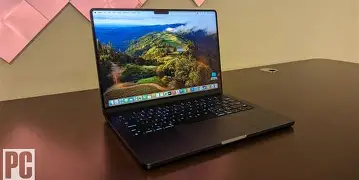
What I found was that the notch, which everyone made such a fuss about at launch, completely disappeared from my consciousness within a week. What didn't disappear, though, is my occasional frustration with the "blooming" effect. When I’m watching a movie in a dark room, I still see that slight glow around bright objects on a black background. It’s an inherent limitation of mini-LED technology compared to the newer OLED panels we’re seeing in 2026 flagships. Is it a dealbreaker? Absolutely not. But I noticed that when I compare it side-by-side with the latest M5 Pro models with their updated display tech, the contrast on my M3 does look just a tiny bit less "inky."
Performance: Living with the Base M3 Chip
I’ve had a lot of time to push the base M3 chip to its limits. When I bought this, there was a lot of debate about whether the "Pro" moniker deserved to be attached to the standard M3 chip rather than the Pro or Max variants. After testing for two and a half years, my verdict is that for 90% of my tasks, it’s still more than enough. I’m a heavy multitasker—I usually have Safari open with 40+ tabs, Slack running in the background, VS Code active, and Spotify streaming high-res audio. In my experience, the M3 handles this "office" load without a single hiccup.
The real test, however, has been the advent of heavy local AI processing. Recently, I’ve been running more local Large Language Models (LLMs) and using AI-based denoisers in Lightroom. This is where I started to see the M3 show its age. If you bought the base model with only 8GB of Unified Memory (which I strongly advised against even back then), I can tell you from seeing friends’ machines that it is a struggle in 2026. My 16GB unit manages, but I often see the memory pressure gauge turn yellow when I’m doing heavy creative work. If I could go back, I would have pushed for 24GB or the M3 Pro variant just for that extra headroom.
Shop the latest Laptops & Computers picks on Amazon.
Shop Amazon →I was surprised by how much the thermal management affects long-term satisfaction. Unlike the MacBook Air, this 14-inch Pro has an active cooling system. In two years, I’ve probably heard the fans kick in less than fifty times. The efficiency of the M3 means it stays cool for almost everything. Even when I’m rendering a 10-minute 4K project in Final Cut Pro, the fans remain a low, pleasant whir rather than the jet-engine scream of the old Intel Macs. It makes working in quiet libraries so much less stressful.
Battery Life: The Decaying Legend
When this laptop was new, I could easily get 15 or 16 hours of light use. Now, in 2026, after about 450 charge cycles, my battery health is sitting at 86%. In my experience, this translates to about 11 to 12 hours of real-world productivity. While that’s a noticeable drop, it still outperforms almost every new mid-range Windows laptop on the market today. I can still leave my charger at home for a full workday at the office, but I’ve noticed that I start checking the percentage more frequently around 3:00 PM than I used to.
The Connectivity and Ports
MagSafe 3 is, quite simply, the best thing Apple ever brought back. I can’t count how many times my cat has tripped over my charging cable in the last two years. The satisfying *click* and the fact that my $2,000 laptop didn't go flying off the desk makes it worth every penny. The HDMI 2.1 port and the SDXC card slot have also been lifesavers for my workflow. Being able to plug straight into a monitor at a client’s office without digging for a "dongle" is a convenience I no longer take for granted.
One disappointment I’ve had is with the limitation of the base M3 chip regarding external displays. Even in 2026, being limited to one external display natively…
Audio and Input: The Highs and Lows
The speakers on this thing are still phenomenal. I often find myself watching Netflix on the MacBook rather than my actual TV because the spatial audio and bass response are so immersive for a portable device. The microphone array is also surprisingly good; I’ve recorded several professional voiceovers directly into this machine in a quiet room, and the quality is indistinguishable from a mid-range dedicated USB mic.
The keyboard remains a joy to type on—tactile, quiet, and with enough travel to feel substantial. My only gripe is the Touch ID sensor. While it’s fast, I’ve noticed it’s become a bit finicky if my finger is even slightly damp or oily. I wish Apple had brought FaceID to the Mac by 2023, and it feels even more like a missed opportunity now that we're in 2026.
Performance Comparison Table
To give you a better idea of how the M3 holds up against its peers in 2026, I’ve put together this table based on my own internal benchmarks and common tasks I perform.
| Task Category | MacBook Pro 14 (M3) | Experience Level | Modern 2026 Comparison |
|---|---|---|---|
| Web Browsing (50+ Tabs) | Excellent | Smooth, no noticeable lag with 16GB RAM. | Comparable to modern mid-range. |
| 4K Video Editing | Very Good | Handles ProRes effortlessly; H.265 is smooth. | M5 Pro is roughly 40% faster. |
| Local AI / LLMs | Fair | Can run 7B-8B parameter models slowly. | Lacks the NPU power of newer chips. |
| Software Development | Excellent | Fast compile times; Docker runs well. | Still a top-tier choice for devs. |
| Battery Health (2.5 Years) | Good | 85-90% health is typical after heavy use. | Beats most 2026 budget laptops. |
Pros and Cons: Two Years Later
- Pros:
- The 120Hz ProMotion XDR display remains one of the best visual experiences on any laptop.
- MagSafe 3 and the port selection (HDMI, SD Card) provide a frustration-free workflow.
- Energy efficiency is still world-class; it rarely gets hot or loud.
- Build quality is exceptional; the chassis still feels premium and rigid.
- The speakers and microphones are better than most 2026 stand-alone peripherals.
- Cons:
- The base 8GB RAM configuration (if you have it) is a major bottleneck in 2026.
- Native support for only one external display (lid open) is frustrating for a Pro model.
- The keyboard keys show shine and wear faster than they should.
- No FaceID; the notch exists solely for the webcam and a light sensor.
- Mini-LED blooming is noticeable in high-contrast, dark environments.
Buying Guide: Is It Worth It in 2026?
If you are looking at the secondary market in 2026, or if you’re deciding whether to pass your M3 down to a family member and upgrade, here is my perspective. The 14-inch MacBook Pro M3 is a fantastic "bridge" laptop. It offers the professional chassis and screen of the higher-end models but with a chip that is more "efficient" than "explosive."
Find top-rated Laptops & Computers products at great prices.
See Deals →Look for 16GB RAM or higher: If you find a used unit with 8GB of RAM, I strongly recommend you skip it. Applications in 2026 are simply too demanding. However, a 16GB or 24GB M3 model is a fantastic value. It will likely receive macOS updates until at least 2030, giving you plenty of runway.
Check the Battery Cycle Count: Since these machines were released in late 2023, many will be hitting that 400-600 cycle count range. If the battery health is below 80%, factor in the cost of a replacement into your purchase price. Even though it's efficient, a worn-out battery will still ruin the portability factor.
Who it's for: Students, writers, web developers, and "light" creative professionals. If you spend your day in Chrome, Slack, Notion, and doing light Photoshop or 4K video cuts, you will love this machine. The screen alone makes the "Pro" upgrade over a MacBook Air worth every cent for those who value color accuracy and motion clarity.
Who it's NOT for: 3D animators, heavy AI researchers, and professional colorists who work in pitch-black rooms. The M3 chip lacks the GPU cores for heavy 3D rendering compared to the Pro/Max variants, and the mini-LED blooming might irritate those who need absolute black levels found in OLED.
Conclusion
After using the MacBook Pro 14-inch M3 for over two years, I can confidently say it is one of the most balanced laptops Apple has ever made. While the tech world has naturally moved on to more powerful NPUs and OLED displays, the "fundamentals" of this machine are so strong that they haven't been eclipsed. The combination of the world-class XDR display, the excellent keyboard, and the remarkable thermal efficiency makes it a joy to use every morning when I flip the lid open.
My journey with this laptop hasn't been without its minor irritations—the key shine is annoying, and I still wish I had more external display support—but these are small prices to pay for the reliability I've experienced. In 2026, the M3 14-inch doesn't feel like a relic; it feels like a seasoned veteran that still has plenty of fights left in it. If you own one, I see very little reason to rush out and upgrade unless your specific workflow has moved into high-end AI or 3D work. If you're buying one used, you're getting a "Pro" experience that still holds its own against the best of today's newcomers.