Keychron Q16 He 8K First Look: Unboxing and Impressions
Introduction to a New Era of Magnetic Precision
The mechanical keyboard landscape is currently undergoing a seismic shift. While traditional mechanical switches dominated the enthusiast space for over a decade, a new technology has emerged to claim the throne for power users and competitive gamers: the Hall Effect magnetic switch. Keychron, a brand that has become synonymous with bridging the gap between niche custom keyboards and mass-market accessibility, has finally brought its heavyweight engineering to this specific arena with the Keychron Q16 He 8K. This keyboard is not just another entry in the Q-series lineup; it represents a specialized tool designed to offer unprecedented levels of customization through magnetic actuation and an 8,000Hz polling rate.
Measuring in with an unconventional 96% layout that features a distinctive left-side "southpaw" numpad, the Q16 He 8K is a bold departure from standard ergonomic designs. It targets a very specific demographic: professionals who require numeric input but want more desk space for their mouse, and gamers who demand the fastest possible response times without sacrificing the utility of a full-sized board. This first look explores the physical presence, the technical innovations, and the initial typing experience of this high-performance peripheral.
Beyond the novelty of its layout, the "He" in the name stands for Hall Effect, a technology that replaces physical contact points with magnetic sensors. This allows for adjustable actuation points, rapid trigger functionality, and a smoother linear feel that traditional leaf-spring switches struggle to match. When combined with an 8K polling rate, the hardware is theoretically capable of transmitting data to a PC eight times faster than the industry-standard 1,000Hz. This article breaks down why these technical specifications matter in real-world scenarios and how the Q16 He 8K stands up to the rigors of modern computing.
Unboxing and Initial Physical Impressions
Lifting the lid of the Keychron Q16 He 8K box reveals the signature density that the Q-series is known for. Keychron has built its reputation on CNC-machined aluminum frames, and the Q16 He 8K is no exception. It is heavy, stable, and feels more like a piece of industrial equipment than a consumer electronic device. The weight is purposeful; a heavy keyboard stays planted during intense gaming sessions or rapid-fire data entry, ensuring that the acoustic profile remains deep and consistent across the entire chassis.
The first thing that strikes any observer is the southpaw layout. For the uninitiated, placing the numpad on the left side of the keyboard serves two primary functions. First, it allows right-handed users to keep their mouse closer to the center of their body, improving ergonomic alignment and reducing shoulder strain. Second, it enables the user to input numbers with their left hand while operating the mouse with their right, a workflow that is incredibly efficient for Excel power users, CAD designers, and video editors. The Q16 He 8K executes this layout with a premium feel, ensuring that the transition from a traditional layout feels earned through better ergonomics.
The keys themselves are topped with double-shot PBT keycaps in the OSA profile. This profile provides a rounded top surface that cradles the fingertips while maintaining a height similar to the standard OEM profile. PBT material is preferred by enthusiasts because it resists the "shine" that occurs on cheaper ABS plastics over time, maintaining a matte texture even after months of heavy use. Underneath these caps lies the heart of the machine: Gateron dual-rail magnetic switches. Unlike standard switches, these have a distinct lack of friction because they don't rely on a metal leaf to register a click or a press. The result is a buttery smooth descent from the top of the stroke to the bottom.
The Hall Effect Advantage: Beyond Traditional Actuation
The core appeal of the Keychron Q16 He 8K is the Hall Effect technology. In a standard mechanical keyboard, a keypress is registered when two pieces of metal touch. This is a binary "on or off" system. Magnetic switches, however, use a sensor to measure the exact distance of a magnet within the switch stem. This allows the user to define exactly where the key "actuates" within its 4mm travel distance. If a user wants a hair-trigger response for gaming, they can set the actuation to a shallow 0.1mm. If they prefer a deliberate, heavy typing experience for writing, they can move it to 3.5mm.
Furthermore, this technology enables "Rapid Trigger." On a traditional keyboard, once a key is pressed, it must travel back up past a physical reset point before it can be pressed again. Rapid Trigger allows the key to reset the instant it starts moving upward, regardless of its position in the travel. For gamers in fast-paced titles like Counter-Strike 2 or Valorant, this means they can stop their character's movement or stutter-step with a level of precision that was previously impossible. The Q16 He 8K brings this competitive edge to a layout that is also suitable for productivity, making it a "sleeper" choice for those who work by day and compete by night.
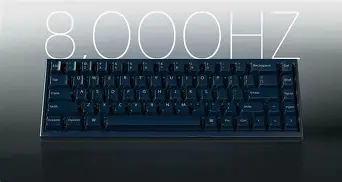
The 8,000Hz polling rate complements this magnetic precision. Most keyboards check for input every 1 millisecond. An 8K board checks every 0.125 milliseconds. While the human eye or hand might not consciously perceive the difference, the reduction in input latency can be the difference between winning and losing in high-stakes environments. It also ensures that the complex analog-to-digital calculations required for magnetic sensing are processed without any bottlenecking.
Discover deals on Laptops & Computers — updated daily.
See Deals →Detailed Feature Analysis and Build Quality
The build quality of the Q16 He 8K follows the "Q Pro" and "Q Max" standards. It features a double-gasket mount design. Instead of the plate being screwed directly into the case, it is sandwiched between silicone gaskets. This provides a slight "flex" when typing, which acts as a shock absorber for the fingers. This makes long typing sessions significantly more comfortable as the "bottom-out" force is dampened. Acoustically, Keychron has included layers of sound-absorbing foam and a PET film to ensure that the magnetic switches produce a "thocky" sound rather than a high-pitched "clack."
Connectivity is another area where the Q16 He 8K excels. It supports both 2.4GHz wireless and Bluetooth 5.1, alongside a stable USB-C wired connection. The 8K polling rate is generally reserved for the wired mode to ensure maximum throughput, but the 2.4GHz wireless mode still offers a highly competitive 1,000Hz polling rate for a cable-free experience. The internal battery is massive, designed to handle the increased power consumption of the 8K MCU and the vibrant per-key RGB lighting. For users who value aesthetic customization, the south-facing RGB LEDs are compatible with a wide variety of aftermarket keycaps, ensuring the light shines toward the user rather than away from them.
Comparison: Magnetic vs. Mechanical vs. Optical
To understand where the Q16 He 8K sits in the market, a comparison of the three primary switch technologies is necessary. Buyers often confuse Hall Effect with Optical switches, as both can offer faster responses, but the differences in customization are significant.
| Feature | Hall Effect (Q16 He) | Standard Mechanical |
|---|