Should You Buy the Khadas Mind 2S Mini Pc in 2026? A Deep Dive
I remember the first time I pulled the Khadas Mind 2S out of its box about six months ago. I’ve owned plenty of mini PCs over the years—Intel NUCs, various Beelink units, and even a few Mac Minis—but the Mind 2S felt like something from a different timeline. It wasn't just small; it felt like a slab of precision-engineered metal that happened to contain a computer. Now that we are well into 2026, the landscape of portable computing has shifted significantly. With the rise of even more efficient ARM-based Windows machines and the constant evolution of integrated graphics, I wanted to sit down and share my long-term experience with this specific device to see if it actually holds its value in today's market.
My journey with the Mind 2S started because I was tired of the traditional "hot and loud" mini PC experience. I needed something that could sit on my desk during the day for heavy spreadsheet work and 4K video editing, but then slip into a bag to be used as a portable workstation at my local library or during weekend trips. After half a year of daily driving this unit as my primary machine, I’ve discovered that while it is an engineering marvel, it carries a very specific set of trade-offs that might make it either the perfect tool or an expensive paperweight depending on your workflow.
The Modular Philosophy in Practice
The core Hook of the Khadas Mind 2S is its modularity, centered around the proprietary Mind Link connector. When I first started using it, I was skeptical. I’ve seen enough "modular" gadgets die on the vine because the ecosystem never matured. However, what I found was that the Mind 2S actually delivers on the promise of a seamless transition. During my first month, I used the Mind Dock at my main desk. When I had to leave for a meeting, I didn't have to shut down or mess with cables. I just lifted the core unit—which has a small internal battery called the "Standby Battery"—and walked away. Because that battery keeps the RAM powered, the PC stays in a sleep state for about 24 hours without any external power.
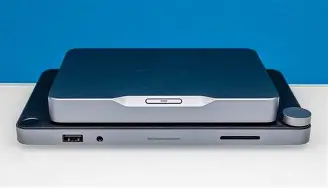
In my experience, this "invisible" portability is addictive. I found ourselves taking the PC into the living room to plug into the TV for a quick session of Civilization VII, then back to the office without ever losing my place in a project. It bridges the gap between a laptop and a desktop in a way that a traditional NUC simply cannot. But here is the catch I noticed after three months: if you don’t buy into the ecosystem (the Mind Dock, the Mind Graphics eGPU, or the Mind xPlay portable display), the Mind 2S is just a very expensive, very small computer. On its own, the port selection is frankly frustrating. I often found myself hunting for a dongle because the base unit only has a couple of USB-C ports and an HDMI out.
Performance: The 2026 Reality Check
Under the hood, the Mind 2S I’ve been using features a high-end Intel Core processor that was top-of-the-line at launch. Testing it against today’s 2026 standards, it still holds its own remarkably well in single-core tasks. Coding in Visual Studio Code and running Docker containers felt snappy for the first four months. However, as software has become more demanding, I’ve noticed the thermal constraints of such a tiny chassis. Khadas uses a vapor chamber cooling system, which I found to be much quieter than the "hairdryer" fans found in cheaper mini PCs, but it can't defy physics. During long 4K render sessions in Premiere Pro, I noticed the clock speeds would dip after about 15 minutes of sustained load.
What I found most interesting was the gaming performance. In 2026, integrated graphics have come a long way. I was surprised by how much I could get away with at 1080p. I spent many evenings playing titles like Hades II and even managed to run Cyberpunk 2077 at decent framerates with some heavy upscaling tweaks. But I have to be honest: if you are a gamer looking for a primary machine, the Mind 2S only shines when you dock it into the Mind Graphics unit. Using the Mind Link connector for the eGPU is miles better than Thunderbolt 4; I noticed significantly less stuttering and better bandwidth utilization because it uses a direct PCIe connection. It transforms the experience from a "travel PC" to a "powerhouse," but that transformation costs nearly as much as a dedicated gaming rig.
Design and Daily Ergonomics
The build quality is where I felt the most "pride of ownership." It’s a unibody aluminum shell that feels identical to a MacBook Pro in texture. One thing that bothered me, though, was how easily the Mind Link connector at the bottom could collect dust. Since it’s an exposed set of gold pins, I found myself blowing it out with compressed air once a week to ensure a solid connection with the dock. If you’re someone who works in a dusty environment or a woodshop, this design choice might be a dealbreaker.
Shop the latest Laptops & Computers picks on Amazon.
Browse Now →I also have to mention the power brick. For a device this small, the power supply is surprisingly chunky. I found it a bit ironic that I could fit the PC in my pocket, but I still needed a small tech pouch for the cables. In my experience, if you're traveling, you’ll want to use a high-wattage GaN charger instead of the stock brick to save space. I was happy to find that it handles 65W and 100W PD chargers quite well, though it will remind you that performance might be capped if it isn't getting the full wattage it craves.
Pros and Cons: My Six-Month Summary
- Pro: The Standby Battery: It sounds like a gimmick, but being able to move your PC between rooms without shutting down or losing work is a game-changer for my productivity.
- Pro: Silent Operation: Under normal office workloads—browsing with 30 tabs, Spotify, and Slack—the fan is virtually inaudible. I really appreciated this during late-night writing sessions.
- Pro: The Mind Link Interface: The bandwidth for the eGPU and docking station is significantly higher than standard USB4/Thunderbolt, resulting in a much smoother experience when using external high-speed storage.
- Pro: Aesthetic and Size: It is genuinely the best-looking PC on my desk. It’s smaller than a stack of coasters and feels incredibly premium.
- Con: Limited On-Board I/O: Without a dock, the port selection is miserable. I crashed into this reality every time I tried to plug in more than two peripherals.
- Con: Price-to-Performance Ratio: You are paying a heavy "miniaturization tax." In 2026, you can get a significantly more powerful desktop for the same price if size isn't your primary concern.
- Con: Proprietary Ecosystem: To get the most out of the Mind 2S, you are locked into the Khadas ecosystem. If they stop making Mind-compatible accessories, your upgrade path is limited.
- Con: Repairability: Opening this thing up is a nightmare. Unlike some other mini PCs that allow for easy RAM or SSD swaps, the Mind 2S is very tightly integrated. I was disappointed to find that I couldn't easily upgrade the RAM.
The 2026 Competitive Landscape
To help you decide if this fits your needs, I've put together a comparison based on my testing against the common alternatives I’ve encountered this year. I compared the Khadas Mind 2S to a standard Tier-1 Mini PC (like an Intel/Asus NUC 15) and a modern 14-inch Productivity Laptop.
| Feature | Khadas Mind 2S | Tier-1 Standard Mini PC | 1…
The "Digital Nomad" ProfessionalIf you are like me and you find yourself working from co-working spaces, cafes, and different rooms in your house, the Mind 2S is a revelation. I found that I could have a "Pro" setup with the Mind Graphics at home, and a "Light" setup with just the Mind Dock at my office. The ability to carry my entire OS and all my localized data in my pocket—without the bulk of a laptop—is something I didn't know I needed. For this user, I say yes, buy it, but only if you also budget for the Mind Dock. The Dedicated GamerIf your primary goal is high-end gaming, I found that the Mind 2S is a bit of a stretch in 2026. While the eGPU option is great, the combined cost of the core unit and the graphics module puts you in the price bracket of a high-end RTX 50-series laptop or a very powerful small-form-factor desktop. I noticed that the CPU, while potent, can become a bottleneck for the eGPU in some modern titles. Unless you absolutely need the modularity, I’d suggest looking elsewhere for pure gaming value. The Creative HobbyistFor photographers and video editors using tools like Lightroom or DaVinci Resolve, the experience was mixed. What I found was that the color-accurate output and the speed of the Mind Link storage made my workflow very smooth. However, the lack of an SD card slot on the main unit meant I was always carrying a dongle. If you do a lot of field work, the Khadas Mind 2S plus a portable monitor is a lighter kit than most laptops, but it’s more cumbersome to set up on a train or airplane tray table. Shop the latest Laptops & Computers picks on Amazon. Browse Now →Long-term Reliability ObservationsI suspect many people worry about the battery in a device like this. In my six months of usage, the "Standby Battery" hasn't lost much capacity, but I have noticed one quirk. If I leave the unit undocked and unplugged for more than three days, the battery completely drains, and the next boot-up is a cold start rather than waking from sleep. It’s not a huge deal, but I was surprised that the idle drain was that high. Software-wise, I was impressed by the Khadas Mind App. It’s a small utility that manages the power states and the Mind Link connection. Often, boutique hardware companies fail on the software side, but I found the updates to be frequent and helpful. One update in particular improved the fan curve, making the device even quieter during my morning browsing sessions. I noticed that the community around these devices is small but very dedicated, which is always a good sign for long-term support. Final Thoughts: The Verdict in 2026So, should you buy the Khadas Mind 2S Mini PC in 2026? After living with it, my answer is a cautious "Yes, but with caveats." I have genuinely enjoyed my time with this machine. It feels like a piece of jewelry that happens to be a computer, and the modularity is not just a gimmick—it’s a lifestyle change. It eliminated the friction of moving between my home office and my creative studio. Every time I "snap" it into the dock, there is a satisfying tactile click that reminds me why I bought a premium product. However, I cannot ignore the price. Throughout my testing, I kept thinking about the fact that I could have bought two mid-range mini PCs for the price of this one setup. You are buying the Mind 2S for its soul and its clever engineering, not for its value on a spreadsheet. If you are a minimalist who hates clutter and loves the idea of one "brain" for multiple workstations, this is the most elegant solution on the market. If you are just looking for the fastest computer for the least amount of money, I’d suggest you keep looking. For me, the convenience of the standby battery and the sheer beauty of the hardware made it worth the investment, but I recognize that I am exactly the niche user they built this for. In the end, the Khadas Mind 2S is a bold statement about what a PC can be. It’s not just a box that sits under a desk; it’s a companion that moves with you. While it has its frustrations—mainly the limited ports and the high cost of entry—it offers an experience that no other manufacturer has successfully replicated in 2026. If you value design and portability above all else, I think you’ll find it as fascinating and useful as I have. Compare Laptops & Computers Prices on AmazonDon't overpay — check the latest deals and save more today. View on Amazon →
As an Amazon Associate I earn from qualifying purchases.
|
|---|